Upload Date: 09/30/2026
Version 3.2.0 release:
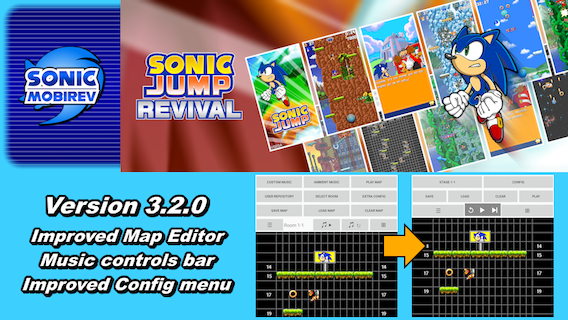
The v3.2.0 of Sonic Jump Revival is now released with another improved Map Editor alongside Furrican's birthday!
The Map Editor now features a music controls bar and an improved Config menu with better organized settings and the ability to preserve configured settings.
Additionally, a new option named "Horizontal Wrapping" is added to let you can bypass one side of the screen to appear to the opposite side during the stage.
This new feature is added as a cheat and an option in the Map Edtior.
LIST OF MODIFICATIONS AND IMPROVEMENTS
Potential:
- Add a new playable character and an ability section for playable characters.
- Make more in-game events.
- Fix the slowdown issue when playing at higher frame rates.*
- Add a fully-functional Multiplayer game mode.*
- Make the game run at 50fps and at normal speed.
*Help wanted. For more information, check out the Projects page.
v3.2.0:
- Join the Custom Music, User Repository and Extra Config menus into one CONFIG button in the Map Editor.
- Separate the Sprites/Backgrounds, Text Boxes and other settings from the previous Extra Config menu into multiple menus in the CONFIG menu in the Map Editor.
- Change the style of the configuration menus of the Map Editor.
- Add an instruction page in the Text Boxes menu of the Map Editor.
- Reorganize the option buttons of the Map Editor.
- Center horizontally the ID numbers in the ID boxes in the Map Editor.
- Rename "SELECT ROOM" to "STAGE X-X" and remove the stage number title in the Map Editor.
- Make a feature where previous configurated settings are preserved anytime you enter the different config menus of the Map Editor.
- Add a message in the Map Editor to save or load your map file before playing.
- Add a new option in the Miscellaneous config menu of the Map Editor to let players wraparound during stages.
- Add a new cheat to let players wraparound during stages (check out the Cheat Codes page for more information).
- Replace the Ambient Music, PLAY/PAUSE and REPLAY button by a music controls bar (REPLAY, PLAY/PAUSE and NEXT) in the Map Editor.
- Add a variable and conditions to make the REPLAY and PLAY/PAUSE buttons functional while no music is selected during the beginning of the Map Editor.
- Add a message to inform users that all unsaved modifications will be lost when selecting the "PLAY" or "STAGE X-X" option in the Map Editor.
- Replace the word "Room" by "Stage" in the Map Editor.
- Recalculate the position of the Y position numbers of the right side of the canvas in the Map Editor.
- Add a feature to change the width of the grid boxes by sliding both fingers horizontally to the opposite sides in the Map Editor.
- Improve the movement of the canvas view in the Map Editor.
v3.1.0:
- Change the tinyWrapped() method to fix a text alignment oversight when playing on default font style.
- Change the size of the grid boxes and the object sprites in the Map Editor to position the objects closely to their in-game positions.
- Remove the type and coordinate numbers around the objects in the Map Editor.
- Remove the background color option in the Map Editor.
- Make an additional option in the Map Editor to toggle between the object sprites and ID boxes.
- Recolor the ID boxes and add ID numbers on them in the Map Editor.
- Add Y position numbers on each side of the stage map in the Map Editor.
- Rename the object names for better resemblance to their variable names in the source code.
- Increase the font size of the room number title.
- Make an additional option to restart a music in the Map Editor.
- Rename the "RESET MAP" option by "CLEAR MAP" in the Map Editor.
- Add a message to inform users that all unsaved modifications will be lost when selecting the "CLEAR MAP" option in the Map Editor.
- Remove the "Restart Music" from the "Music Controls" menu and rename it to the "Custom Music" menu in the Map Editor.
- Fix an oversight in the Map Editor where the game stops working after restarting the music while no music is playing.
v3.0.0:
- Fix the auto-language detection.
- Fix the font style change when entering and exiting the EVENT INFORMATION menu.
- Bring back the PLAY GAME option by making a new menu combining the STORY MODE, SPEEDRUN MODE and CHARATER SELECT menus.
- Make a brand-new Character Select section with character portraits.
- Make the playable characters (expect Sonic) unlockable over game progression.
- Add Amy as a playable character.
- Change the speed of Knuckles' Spiral Upper.
- Add a modified version of the SECONDS REMAINING menu after selecting SPEEDRUN MODE.
- Add a Mod Loader menu to load external mods to the game (locked behind the cheat code).
- Make the names of the hidden features locked behind the cheat code cyan.
- Replace the PuyoSega logo by the SAGE EXPO 2026 logo (for the SAGE 2026 edition).
- Add the SAGE EXPO website link to the INTERNET menu (for the SAGE 2026 edition).
- Prevent hidden features access from completing the game.
- Remove the SPRITES option from the save/load data.
- Make the SPRITES option in the GRAPHIC STYLES menu hidden behind the cheat code, due to certain characters lacking J2ME sprite variants.
- Display the virtual pad during the GRAPHIC STYLES menu.
- Update the tinyWrapped() method to improve the line breaks of cutscene and tutorial text.
- Update the hugeprintJ2ME() method and add multiple props[] tables to improve the larger J2ME text.
- Add a new "jumpTime" variable to fix some double jump animations.
- Change Shadow's falling speed.
- Keep Tails from descending slowly when using his Propeller Flight until he lands.
- Change Tails attack conditions to prevent attacking enemies from below when descending with his Propeller Flight.
- Add a quick descend command for Tails and Amy while performing the Super Jump ability.
- Increase the loading screen frame rate to 50fps.
- Change all values related to animation frames, speed and time to run at normal speed during 33.3fps.
- Add a "fpsmode" variable to toggle all modified values for 16.7fps and 33.3fps.
- Add an option to toggle the frame rate in both the Options and Pause menu.
- Change Shadow's Double Jump physics.
- Improve the Soundtrack Select Menu presentation during the Options menu and fix the soundtrack change when selecting one.
- Prevent resuming gameplay when the fps is different from the other during the Pause menu.
- Make the screen width compatible with aspect ratios lower than 16:9.
- Add a new variable to change the touch input x-positions if the screen width is wider than 16:9.
- Replace the portrait view by "screenSize" and "screenLayout" in the AndroidManifest for accessing screen orientation.
- Add a screen orientation feature (portrait, landscape and reversed-landscape).
- Remove some touch control limit to press the arrows or "select" icon outside of the game canvas.
- Improve the tutorial text presentation and tinyprint text position.
- Improve the game controller inputs.
- Fix the controller inputs to prevent them from repeating despite being released.
- Add a new "KEY_HELD" variable to prevent a button or a key to repeat the input while holding it (except for the directional keys and D-Pad).
- Disable the gamepad and keyboard controls when accessing an Internet site or the Map Editor, due to control input issues.
- Make the old cheat only available between the loading screen and the Main menu and make the BACK button act like a conventional back key.
- Replace the "backPressCount" variable by the original cheat variables to activate the cheat.
- Add new keyboard inputs.
- Add new cheats using the keyboard (check out the Cheat Codes page for more information).
- Replace the interrupt screen by the Pause menu while leaving the app or pressing the Start button during stages.
- Bring back the unused softkey icons when using a gamepad or keyboard.
- Add HELP and TUTORIAL text about keyboard controls when the gamepad or keyboard is used.
- Separate the GAME WEBSITE and SONIC MOBIREV links into 2 options in the INTERNET menu.
v3.0.0 (Beta):
- Make the J2ME fonts set by default.
- Add a save data location to "Android/media".
- Add new abilities for Tails and Knuckles.
- Add Tails and Knuckles as playable characters (Tails is now available from the start).
- Fix the double jump sprites of Sonic and Shadow.
- Improve the Russian language.
- Use the new Sonic sprites in the "player" folder instead of the original "196619.png" sprite sheet.
- Add a new "player" folder to add more playable characters and change their in-game positions.
- Change the tinyprint font size from 24 to 18 (except in Japanese and Chinese).
- Make a new tinyWrapped() method to implement auto-line breaks for tinyprint text (only during the cutscenes and the in-game HELP text).
- Make the Chinese language compatible with the J2ME fonts (hugeprint text only).
- Change the "font.png" sprite sheet to add hugeprint characters (except for Russian and Ukrainian) and Chinese numbers.
- Add new special characters to replace in specialCharacterReplace().
- Bring back the animated tinyprint text during cutscenes.
- Add new methods related to the J2ME fonts and special character replacements when changing the FONTS option.
- Replace the J2ME fonts of the "fonts" folder by the ones from the "font.png" sprite sheet when FONTS: J2ME.
- Add the Ukrainian language to the mod.
- Change the introduction animation.
- Add Android TV compatibility (Not finished).
- Fix the save glitch on certain Android devices.
- Increase the ExtrasPic[] and ExtrasPicBackup[] maximum value to 23 to fix a cutscene bug during Bonus Zone Act 3.
- Add controller support (Not finished).
v2.2.0:
- Make a Russian version of the mod (made by Moonneo).
- Increase the stringlist[] value from 50 to 64 to display 64 lines of text per string.
v2.1.0:
- Fix the sound effect lag.
- Convert the language files from .dat to .json format.
v2.0.0:
- Remove the monthly_mode conditions to make the game run properly.
- Remove the Android navigation bar.
- Make the game functional on Android 8 and above by removing an obsolete touch command.
- Add the Chinese language to the mod.
- Remove the Closing Activity message when pressing BACK on the Android navigation bar.
- Move the game canvas to the top of the screen to fit with the menu touch controls.
- Extract all the sprites of the .pak files and place them in the assets folder.
- Make the Language Select menu functional.
- Add a GAME WEBSITE link in the MAIN menu.
- Add an auto-language detection.
- Add Shadow the Hedgehog as a playable character.
- Improve the audio quality of "tune07".
- Replace .mid files by .ogg files.
- Add a SPEEDRUN MODE with a new record in the HIGH SCORES menu.
- Change the name of PLAY GAME to STORY MODE.
- Add a SOUND TEST menu in the OPTIONS menu.
- Replace the original game intro by the one based on a China Mobile version of Sonic Jump.
- Replace the Enable Sound menu by the SOUNDTRACK Select menu.
- Add in-game events and an event information menu to announce the events.
- Fix the sound lag for certain Android devices.
- Add an option to change the virtual pad graphics.
- Rearrange the OPTIONS menu for better presentation.
- Add a CRT option to change the screen display aesthetics.
- Rename the GAME WEBSITE option into INTERNET (GAME WEBSITE is available in this option).
- Add an ONLINE STAGES link in the INTERNET menu to play online stages built via the Map Editor.
- Increase the stage selection input width from 68/68/68 pixels to 75/80/75 pixels.
- Add a cheat code to unlock all new unapproved content (check out the Cheat Codes page for more information).
- Add a Map Editor to save/load/play your own maps and listen to music.
- Add an option to change in-game sprites (Default/J2ME).
- Add an option to change font styles and make the J2ME font styles the default option for the SHC version of the game.
- Add an additional option sub-menu named GRAPHIC STYLES for the pad, sprites, fonts and CRT filters.
v1.1.0:
- Improve the double jump command when VIRTUAL PAD: OFF by removing the limit to the Select Icon.
- Improve the game soundtrack for better audio quality.
- Make an English, French, Italian, German, Spanish, Traditional and Brazilian Portuguese version of the mod.