If you want to ask questions about Sonic Jump Revival and game modding, you may find the answers that you are looking for in this page!
Select a question to showcase the answer.
➤
The game doesn't boot up and instead showcases a list of applications. What can I do?
If you boot up the game for the first time, you will be granted with the All files access menu with a list of applications present on your device.
Search for Sonic Jump Revival and then enable Allow access to manage all files. If you have done it correctly, you can hear the intro jingle in the background.
The files access permission is necessary for saving your game progress, options and map files.
➤
Why does the game have a terrible frame rate?
The game is actually intended to run at such a low frame rate. This is not a glitch, nor a performance issue.
This is something that could be potentially fixed in the future.
For more information, check out the Frame Rate Increase project page.
➤
Why can't I install the game?
Because the game is designed for older Android devices, you may encounter an "Unsafe app blocked" message. When this occurs, press "Install anyway" to proceed.
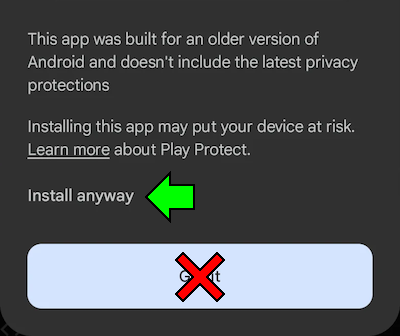
If the problem still persists, contact Furrican via the Game Jolt/itch.io project page, or via the Contact menu.
➤
Is Sonic Jump Revival safe?
Yes. Like many Sonic fangames, this game does not contain any malware or other malicious programs whatsoever.
➤
Can I play Sonic Jump Revival on PC?
Of course. To do so, you need an Android emulator (like BlueStacks).
➤
Is Sonic Jump Revival a fangame?
No. Sonic Jump Revival is actually a mod of an already existing Android port of Sonic Jump.
This Android port was released in 2011 via a service named Puyo Puyo! Sega. This service is provided by SEGA exclusively for Japanese mobile phones.
➤
Why are the music and sound effects different?
The Android port of Sonic Jump has issues with some of its music and sound effects. Some .mid instruments sound too loud.
Because of this, some music and the attack sound effect needed to be replaced by better audio quality.
The game now contains .ogg files, instead of .mid.
➤
Why is the game asking me to access data on my device?
When booting Sonic Jump Revival for the first time, the game asks you for permission to access file data.
If you allow permission, a folder named SonicJump will be created in the Android/media folder. The SonicJump folder is where your save file is located (sj_save.dat).
➤
How long does Sonic Jump Revival take to be released?
Sonic Jump Revival has begun development by November 2025 and has a fluid development cycle. Therefore, it took approximately 6 months for Sonic Jump Revival to be completed.
However, the game is currently in a beta state.
The final version will be released soon.
➤
Can I play Sonic Jump Revival with a game controller?
While Sonic Jump Revival have game controller support, the controls aren't set up correctly.
Because of this, it is not recommended to play the game with a game controller.
When playing on an emulator, you can actually use the arrow keys to play, but your controls are limited in this way.
➤
After using the Map Editor, the stage isn't turned into my own after saving. What is going on?
The problem mostly comes from the CONFIG menu. If the stage name and graphics aren't changed, make sure to configure all settings before saving.
Sometimes, if the stage layout isn't changed despite modification before saving, it is possible that the game hasn't loaded the stage correctly. If so, go back to the Map Editor, load your map and save it again.
➤
Why is there no music in my own stage?
If you have selected a custom music and checked this option, the music takes time to load when playing the stage, because the custom music are stored in an external library.
If you have no music played during stages, you can bring the regular game soundtrack back by saving your map as a .bin file.
➤
I don't remember which file is my stored map and where to find it. What can I do?
The map files are located in the SonicJump subfolder. This folder is most probably located in the ⤓ DOWNLOAD folder of your internal device.
Also, because map files don't overwrite anytime you save, you might ended up with a lot of duplicated files.
But the file with the biggest number in ( ) has to be the most recent one.
You need to organize your files to avoid confusion. For better organization, make sure to store and backup your latest map file before starting making a new map.
➤
My game map doesn't appear in the Online Stages page. What can I do?
If the New Issue menu doesn't let you select labels, your issue won't be labeled as a custom map after saving in the repository and your issue won't be visible.
However, you can still find your issue by removing the Custom map label of the repository search bar.
If you want your issue to be labeled while you can't, try to contact GdGohan to inform him of the issue.